Drawboard - Real-time PDF markup tools.
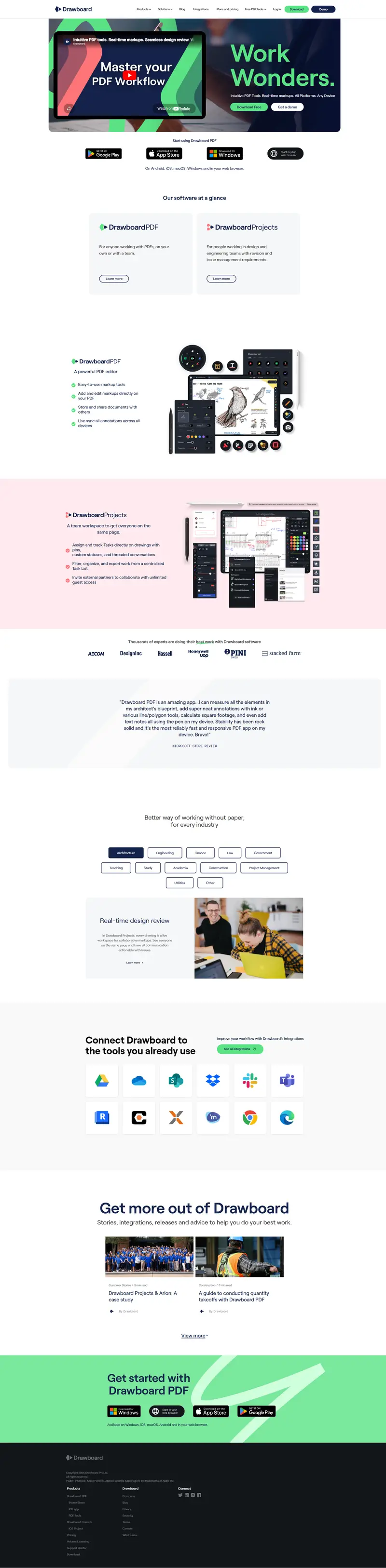
Desktop · Light · scroll within frame to see full page
Design System Inspiration
Drawboard — extracted via DESIGN.md
Productivity · PDF markup & collaboration
Typography
Roobert
Heading
Gt america mono trial
Body
Color palette
TL;DR
Drawboard utilizes a "monochrome-plus" system where a deep navy "Ink" (#14234b) provides foundational structure against a light gray canvas (#f6f7f8). The primary energetic driver is a high-visibility Lime (#5ae284), used exclusively for primary actions and key brand highlights. Typography is led by Roobert, a geometric sans-serif that maintains a professional yet approachable technical feel across a wide scale from 12px captions to 56px display headers. The system relies on generous vertical spacing (up to 60px) and a mix of sharp 0px corners for layout containers and ultra-soft 50px pill shapes for interactive elements.
Target audience
The target audience is professionals and teams seeking robust, real-time PDF markup and collaboration tools across various platforms.
Full tech stack
Analytics
Meta description
Best PDF markup and collaboration tools for Windows, iOS, macOS, Android and your web browser. Download today.
Brand Voice
Professional, efficient, and encouragingly direct.
Positioning
Drawboard provides intuitive PDF markup and design review software for individuals and collaborative teams. It is specifically built for professionals in design, engineering, and architecture who need to move beyond paper to a real-time digital workspace.
Voice principles
- —Efficient: Uses short, punchy sentences that respect the user's time.
- —Collaborative: Emphasizes shared workspaces and keeping everyone "on the same page."
- —Accessible: Uses plain English to explain technical workflows (e.g., "markups" instead of "annotations").
- —Helpful: Maintains a positive, "can-do" attitude in support contexts without being overly bubbly.